


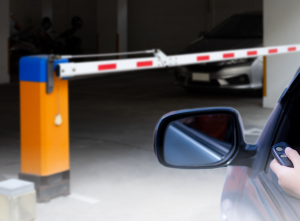
Automatic barriers are part of everyday risk management across offices, warehouses, schools, healthcare sites, car parks and mixed-use premises. For facilities managers, installers and office managers, they sit at the meeting point between safety, access control and day-to-day operations. When they work well, people move through a site smoothly and incidents are avoided. When they are poorly specified or maintained, they quickly become a source of frustration, downtime and risk.
This guide explains how all types of physical barriers fit together in real installations: gates, rising barriers, controls and the supporting safety devices that keep people and vehicles moving safely. It is written for those responsible for specifying, managing or upgrading systems, not for browsing product catalogues. The focus stays on practical decisions, typical components used on UK sites, and common issues seen on live installs. By the end, the reader should have a clearer view of how pedestrian automatic barriers and vehicle barriers are designed, how controls interact with safety devices, and how to plan systems that remain reliable as sites change.
What automatic barrier systems look like in practice
At a high level, automatic barriers control movement. They can separate pedestrians from vehicles, restrict access to authorised users, or manage traffic flow at entrances and exits. Most systems share the same building blocks:
- Physical barrier – swing gate, sliding gate, turnstile, rising arm barrier, bollard or roller shutter.
- Control method – reader, keypad, push button, remote control or intercom.
- Control panel – the “brain” that decides when movement is allowed.
- Safety devices – safety edges, photocells or beams that prevent impact.
- Exit and emergency release – exit buttons, break glass units or fail-safe releases.
- Power and cabling – mains supply, low-voltage distribution and protection.
Pedestrian safety barriers tend to focus more heavily on safe egress and accessibility, while vehicle barriers place extra emphasis on detection and impact prevention. In both cases, the interaction between controls and safety devices is what makes the system acceptable for daily use.
A practical decision framework
Before looking at hardware options, it helps to answer a small set of practical questions. These narrow choices quickly and prevent over-engineering.
- Who uses the barrier today, and who might use it later? Staff only, visitors, deliveries, residents, or the public.
- How often does it operate? A few times a day or hundreds of cycles.
- Is it pedestrian, vehicle, or mixed use? This affects detection and safety requirements.
- What happens in an emergency? Fire escape routes and fail-safe operation must be clear.
- Does it need to link to other systems? Access control, CCTV, fire alarm or building management.
- Is the location internal or external? Weather, vandal resistance and cable protection matter.
Answering these early reduces the risk of mismatched controls or missing safety elements.
Standalone vs networked controls
Automatic barriers can be run from simple standalone controllers or from networked systems.
Standalone systems are common on single gates or small sites. They are cost-effective, quick to install and easier to fault-find. Changes are often made locally at the panel.
Networked systems connect multiple barriers and doors to central software. They suit larger estates, multi-tenant sites and places where audit trails matter. The trade-off is higher planning effort and reliance on network resilience.
Reader and control options at barriers
Different control methods suit different risk levels and traffic patterns.
- Proximity readers are widely used for staff and regular users. They are quick and familiar, but require processes for lost cards or fobs.
- Keypads reduce physical credential management and are common on service entrances. Codes need regular review to prevent permission creep.
- Biometric readers appear at higher-security sites or where credential sharing must be avoided. They require careful handling of personal data and clear policies.
On vehicle barriers, controls often combine readers or keypads with remote controls for convenience. Compatibility between remotes, receivers and control panels is a common source of confusion, which is why many sites standardise early.
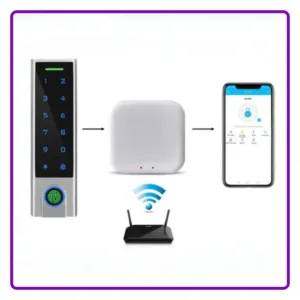
IP-based control: what it means on site
“IP” simply means the controller communicates over a network. In practice, this allows remote management, central reporting and easier expansion. It also introduces questions around IT ownership, network segregation and power resilience.
For automatic barriers, IP control works best when responsibilities are agreed early: who maintains the network, how downtime is handled, and how updates are managed.
Door and barrier hardware basics
The physical hardware affects both safety and compliance.
- Electromagnetic locks are common on pedestrian gates and doors where free egress is essential. They must release on fire alarm or power loss.
- Electric strikes suit controlled doors that still need mechanical latching.
- Motorised gate drives and barrier arms require correctly specified safety devices to prevent impact.
Fire strategy, door construction and usage patterns all influence the correct choice.
Safety devices: stopping movement when it should stop
No automated barrier should operate without safety detection, unless in deadman mode. The three most common options are safety edges, photocells and beams. Each has strengths depending on barrier type and environment.
This topic deserves its own detailed comparison, including failure modes and testing routines.
For vehicle barriers, detection extends beyond impact prevention. Ground loops and wireless vehicle detection help decide when a barrier should open or remain open.
Control panels: what they actually do
The control panel coordinates inputs and outputs: readers, safety devices, motors, locks and indicators. Understanding its capacity, power output and expansion options avoids later problems.
Key considerations include input voltage, relay ratings and how safety circuits are monitored.
Power supply choices matter here too. Single phase and three phase power have different implications for larger barriers and shutters.
Exit methods and emergency release
Pedestrian safety barriers must allow people to leave without delay. Exit buttons, touch-free sensors and emergency break glass units are all common.
Touch-free release improves accessibility and hygiene but needs careful positioning to avoid accidental activation.
Emergency release devices should be clearly labelled, tested and included in staff training.
Installation mistakes that cause long-term issues
Many recurring faults trace back to early decisions:
- Undersized power supplies leading to voltage drop.
- Poor cable routing at external gates.
- Readers mounted too close to moving metal.
- Safety devices not tested under real conditions.
- Exit routes added later without revisiting controls.
Commissioning should include realistic scenarios, not just basic open-close tests.
Outdoor and perimeter installations
External automatic barriers face weather, impact risk and tampering. Reader housings, conduit protection and drainage all affect reliability. Pedestrian safety barriers outdoors also need clear signage and lighting to guide users safely.
Upgrading older systems without disruption
Many sites upgrade in stages. Replacing safety devices or control panels first often improves compliance without changing the barrier itself. Planning staged upgrades keeps entrances operational and spreads cost.
Conclusion
Automatic barriers work best when controls, hardware and safety devices are considered together. For facilities managers and installers, the priority is not complexity but reliability: barriers that respond predictably, release safely and cope with daily use. Clear decisions around control type, power, detection and exit methods reduce faults and make future changes easier. Pedestrian safety barriers, in particular, benefit from early attention to egress and accessibility, while vehicle barriers demand robust detection and protection against impact.
Taking time at the planning stage pays off later. Correct power sizing, sensible reader placement and a clear approach to permissions all reduce admin effort. As sites grow or change, systems that were designed with expansion in mind adapt more easily. The result is a safer, calmer flow of people and vehicles, supported by controls that do their job quietly in the background.