



What Access Control Panels Actually Do (and Why They Matter)
Access control panels are the backbone of modern door entry systems, responsible for ensuring secure and efficient communication between components like readers, locks, and door hardware. The panel plays a pivotal role in how these elements interact, making it essential for overall system functionality. The choice of access control panel directly influences system reliability, ease of maintenance, and potential for future upgrades or expansion. This section provides a closer look at how access control panels function in day-to-day operations, detailing their role in coordinating access, handling data, and maintaining security. It also highlights the impact of panel selection on long-term system performance and scalability.
What an Access Control Panel Really Is
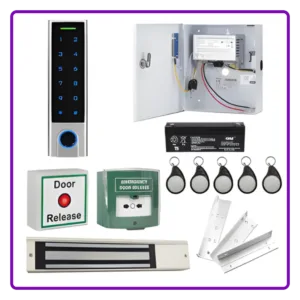
An access control panel is the decision-making unit of a door entry system. Readers, keypads, intercoms and exit devices collect input. The panel processes that input against stored rules and then instructs outputs such as electromagnetic locks, strikes, maglocks or automatic operators.
When someone presents a credential:
- The reader sends data to the panel
- The panel checks permissions
- The panel activates or denies the lock release
- The event is logged (if supported)
In standalone systems the control panel is built into the reader or keypad itself.
Some confusion arises around the term what is an access panel. In building terminology, that phrase can refer to a removable inspection hatch. In access-control terms, it refers to the electronic control unit that manages door permissions. Clarity matters, particularly when estates teams and contractors use similar language for different components.
How Access Control Panels Process Decisions
At a practical level, panels perform five core functions:
1. Credential Validation
The panel stores user permissions locally or communicates with a server. It determines:
- Who can access which doors
- At what times
- Under what conditions
In networked or cloud-based systems, the panel may synchronise with management software but still make decisions locally. This is important for resilience. If the network drops, the panel continues operating.
2. Door Monitoring
Panels monitor door contacts to confirm:
- Door opened
- Door forced
- Door held open too long
These signals influence alarms, logging and sometimes automatic relocking behaviour.
3. Lock Control
The panel supplies or switches power to:
- Electric strikes
- Magnetic locks
- Motorised locks
- Automatic door operators
Correct configuration determines fail-safe or fail-secure behaviour in line with fire and life safety requirements.
4. Event Logging
Every access attempt can be logged:
- Successful entry
- Denied entry
- Time and location
- User identification
This log becomes important for audits, investigations and compliance. Not all hardware/software supports this feature, but it is becoming more important for customers.
5. Integration Management
Modern panels may interface with:
- Fire alarm inputs
- Intruder alarms
- Lift controls
- Turnstiles
- Intercom systems
The panel acts as a junction between building systems.
Panel Types and Architectural Differences
Not all access control panels operate the same way. Specification decisions affect reliability and expansion.
Standalone Panels
These control a single door and may not require central software. Suitable for:
- Small offices
- Remote buildings
- Single-tenant units
However, scalability is limited. Adding doors often requires replacing hardware.
Networked Panels
These connect to a central server or cloud-based platform. They allow:
- Multi-site management
- Central reporting
- Remote user changes
Network dependency introduces cybersecurity considerations. Guidance from the National Cyber Security Centre should be considered during system design.
Cabling, Power and Environment Considerations
Access control panels are often installed in risers, cupboards or comms rooms. Their placement affects:
- Cable runs
- Voltage drop
- Battery backup capacity
- Service access
Panels typically require:
- Mains power with compliant isolation
- Backup batteries sized to ensure locking during power outages
- Correct earthing and surge protection
Electrical safety standards should be observed in accordance with Health and Safety Executive guidance.
Environmental conditions also matter. Excess heat or damp can reduce board lifespan. Panels should not be placed in areas prone to condensation.
Compliance and Fire Safety Interaction
Access control panels must respond correctly during fire alarm activation.
Typical requirements include:
- Automatic release of fail-safe locks
- Free egress via break glass or emergency hardware
- Clear escape routes
Failure to configure fire relay inputs properly can create serious compliance risks.
Facilities managers should review fire door obligations under workplace fire safety law.
Panels must be wired and programmed so that life safety overrides access restrictions. This is not a software preference but a regulatory obligation.
Common Mistakes in Panel Specification
Several practical issues arise during real installations:
Underestimating Door Growth
Selecting a panel with no spare capacity can create unnecessary future replacement costs.
Ignoring Network Segmentation
Placing panels on unsecured IT networks increases vulnerability. IT and facilities teams should coordinate early.
Insufficient Backup Planning
Battery sizing is often overlooked. If the panel fails during power loss, doors may default to an undesirable state.
Confusing Relay Capacity
Lock current draw must match panel output ratings. Overloading relay outputs shortens lifespan.
Impact on Day-to-Day Management
From an operational perspective, access control panels determine how easy it is to:
- Add or remove users
- Create temporary access
- Manage contractors
- Run reports
- Isolate problem doors
If the panel architecture is rigid, administrative burden increases. If it supports clear zone grouping and scheduling, management becomes more efficient.
For example, estates teams handling shift patterns rely on panels that support layered time schedules. Without that capability, manual intervention becomes frequent.
Future Expansion and System Changes
Control panels influence long-term adaptability. Consider:
- Door count limits
- Reader protocol compatibility
- Firmware update capability
Changing from card to mobile credentials may require panel firmware support. Integrating intercom or gate automation also depends on available inputs and outputs.
Practical Takeaways
What this affects most
- System reliability
- Life safety compliance
- Administrative workload
- Expansion cost
Who benefits from understanding panel capability
- Facilities managers overseeing multiple doors
- Installers planning phased upgrades
- IT managers responsible for network security
What should be planned early
- Door capacity allowance
- Fire alarm interface
- Network structure
- Backup power duration
Later-stage changes are possible but often more disruptive and expensive.
Conclusion
Access control panels determine how a system behaves under normal operation, during faults and in emergency conditions. They govern decision-making, logging, compliance response and integration with wider building systems.
Selecting and configuring the right panel influences reliability, audit capability and long-term flexibility. For facilities and estates teams, understanding this component reduces operational friction and supports safer buildings.
Within the broader access-control structure, the panel acts as the system’s control point. When specified carefully, it allows the rest of the infrastructure to function predictably and adapt to future requirements without unnecessary replacement.