ML8 RS3 KIT Single Phase Control Panel with Impact Detector
£206.40 ex VAT
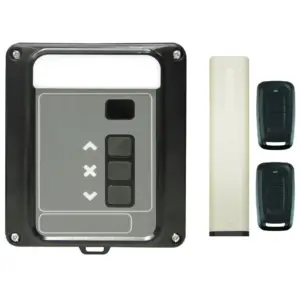
The ML8 RS3 KIT is a single phase control panel and wireless safety kit for single phase roller shutter doors up to 4 metres wide.
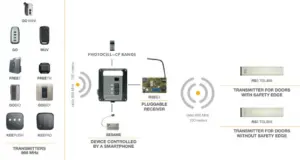
The innovative RadioSens3 is a third generation communication system via radio without safety edges. The system still offers all the guarantees and complies with all the same requirements as a rubber safety edge system, but takes a fraction of the time to install. All the installer needs to do is screw the Radiosens3 (RS3 TGL868) transmitter to the bottom slat of the roller shutter and program the system. It works as a security band, detecting impacts against an obstacle before the force exceeds the limits allowed by standards and reversing the door.
- Wire-free installation between transmitter and receiver
- No safety edge needed
- For roller shutters up to 4m wide
- 2 adjustable sensitivity settings
- Minimum motor speed of 15 rpm required. 17 rpm optimal
- With 2mm movement tolerance between the last and penultimate slat
- The kits include: ML8 single phase control panel, a plug in safety receiver card, the Radiosens3 impact detector safety transmitter & 2 x MUV2-HP remote controls.
Designed for maximum ease of installation and programming.
- Installers can save time and cut costs due to the fact that there is no safety edge that needs to be attached and no cables, as radio technology is being deployed.
- Simply attach the transmitter, wire up the control panel and the installation is complete, just programming is now required!
- Control panel comes pre-wired with 2 metres of cable with a 3-pin plug on.
Please Note:
If you’re purchasing this for a new system, please select the Quantek option.
If you’re purchasing this as a replacement, please ensure your existing unit was originally supplied by us (Quantek) or Birkdale, otherwise your existing remotes will not be compatible with the new control panel.
If you’re unsure, please contact us, our team will be happy to help confirm compatibility.
Single Phase Control Panel Specification
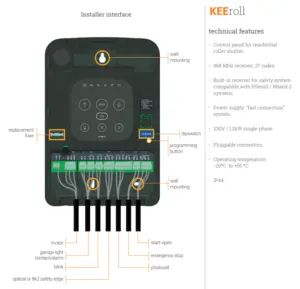
- Control panel for 1 single phase motor
- Power supply/Max. Pow. 230V/1CV (0.75kW) or 1.2 kW engine
- Built in 868MHz radio receiver for wireless controls. High security rolling code, cannot be cloned. 27 codes, expandable by 500 and can be managed by the ASSISTANT system if required
- N.C Photocell input
- N.C Stop input
- N.O Start input
- Inputs can be configured to suit specific requirements prior to shipping
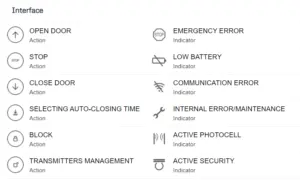
- Active input-output indicator
- Status indicator by means of ERROR LED
- Courtesy light and control buttons on the front cover
- 5 Year Warranty!
RadioSens3
- Detects impact without the need for a safety edge
- Complies with same regulations as a safety edge would
- Quick and easy to install and program
- 2 adjustable sensitivity settings
- Minimum motor speed of 15 rpm required. 17 rpm optimal
- Transmitter power: 3V (2 x AA batteries)
- 50 metre range
- Max door width: 4 metres
- Transmitter dimensions: 40 x 194.5 x 20mm
- IP44
MUV2-HP handheld remote transmitters
- 868MHz high security rolling code
- 2 channels
- Robust design
- 100 metre range
- Single phase roller doors up to 4 metres wide.
▪ Control panel is beeping 4 times
Answer:
- Change the batteries in the safety edge transmitter.
▪ The door moves in the opposite direction to what it should
Solution:
- Turn off the power. Swap the brown and black motor wires.
▪ Door won't close
Solution:
- Note: The door will revert to deadman if there is a fault with the radiosens or photocell. Press and hold the close button on the panel or remote, after a few seconds it will start to close.
- The LEDs above the inputs (IN1, IN2 & IN3) indicate whether the input is active. If the LED above IN1 is on, you have a problem with the photocell circuit. If the LED above IN3 is on, you have a problem with the stop button circuit.
- If IN1 is on, check the photocell is clean, aligned properly that the cables are undamaged. If no photocell is fitted, check the terminals are linked.
- If IN3 is on, check that the emergency stop button hasn’t been pressed and that the cable to it is undamaged. If no stop button is fitted, check the terminals are linked.
- Reprogram the safety edge and door movement.
- If the door has been running a lot in a short period of time and the control panel is clicking when it receives an input, it is likely the motor thermal cutout. Wait half an hour and try again. This is not a problem with the control panel.
- If the control panel is clicking when a remote or button is pressed, check the motor wiring and condition.
- Check there is power to the panel and check the fuse.
▪ Door is stopping and reversing at random places
Solution:
If a new install, turn down the sensitivity (don’t forget to re-program the transmitter into the receiver card).
If this occurs months/years after install:
- Ensure the door and guide rails are clean and lubricated.
- Follow the video tutorial to reprogram the door movement. If problem persists, turn down the sensitivity.
▪ Door won’t open
Solution:
- The LEDs above the inputs (IN1, IN2 & IN3) indicate whether the input is active. If the LED above IN3 is on, you have a problem with the stop button circuit.
- If IN3 is on, check that the emergency stop button hasn’t been pressed and that the cable to it is undamaged. If no stop button is fitted, check the terminals are linked.
- If the door has been running a lot in a short period of time and the control panel is clicking when it receives an input, it is likely the motor thermal cutout. Wait half an hour and try again. This is not a problem with the control panel.
- If the control panel is clicking when a remote or button is pressed, check the motor wiring and condition.
- Check there is power to the panel and check the fuse.
▪ The door doesn’t do the final closing when programming the door movement
Solution:
- Ensure IN1 & IN3 LEDs are not on. (See previous sections).
- Ensure dipswitch 1 if OFF in the transmitter. Dipswitch 2 should be ON if setting the inhibition point automatically, or OFF if setting it manually (most people have it set for automatic.)
- Reset the receiver card. Then re-program the transmitter and door movement.
▪ 14 beeps when trying to program RS3 transmitter
Answer:
- There’s already a transmitter programmed into the memory, only 1 is allowed. Reset the memory.
| Weight | 1.75 kg |
|---|---|
| Option | Quantek, Birkdale |
Related products
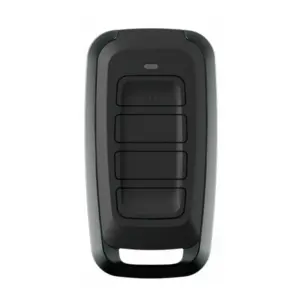
MUV4-HP 4 Channel Deadman Remote Control
£26.50 ex VAT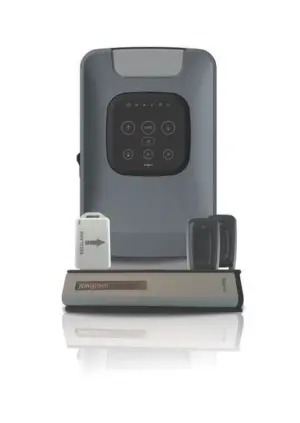
KEEROLL RS3 ALARM KIT Roller Garage Door Control & Safety Impact Detector
£214.21 ex VAT
Sesame 2L Smart Phone Door Controller
£74.47 ex VAT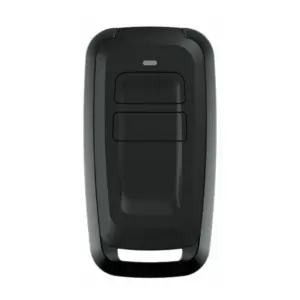
MUV2-HP 2 Channel Dead Man Remote Control
£24.70 ex VAT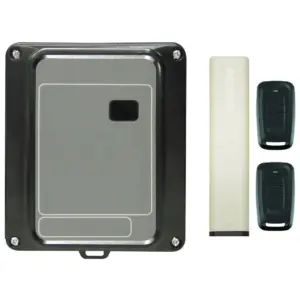
M8 RS3 KIT Control Panel with Impact Detector & 2xMUV2-HP
£163.25 ex VAT