


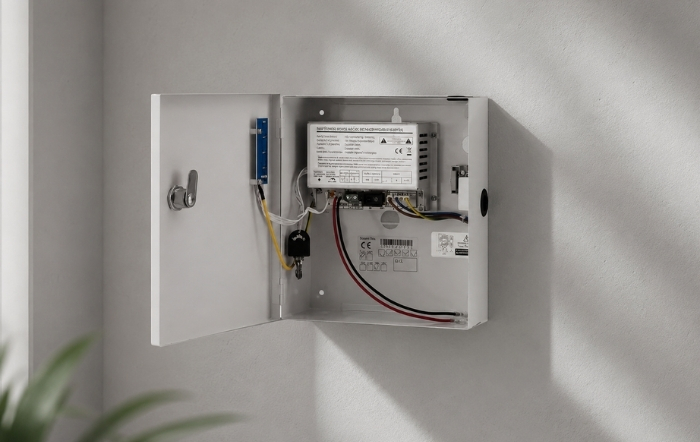
A power supply is one of the least glamorous parts of an access control installation. It is also one of the most important. Get the specification wrong and you will spend time on callbacks, chasing intermittent faults, or explaining to a client why their door failed open during a mains outage. Get it right and it runs for years without complaint.
This guide covers how to choose the correct access control power supply for your installation, including voltage, amperage, battery backup, and enclosure type. The same principles apply across every access control setup, from a single door to a multi-door commercial site.
What Does an Access Control Power Supply Actually Do?
An access control power supply takes mains voltage (230V AC in the UK) and converts it to a lower DC voltage, typically 12V or 24V, at a level that is stable and safe for locking hardware, readers, and controllers.
Most access control components cannot run directly from mains power. Maglocks, electric strikes, proximity readers, keypads, and door controllers all require regulated low-voltage DC. The power supply unit (PSU) is what provides that.
Beyond simple conversion, a quality access control PSU will also:
- Regulate the output voltage to keep it stable under varying loads
- Protect against short circuits and overloads
- Charge and maintain an internal backup battery
- Alert you to mains failure or battery fault via indicator LEDs
A poor-quality or undersized PSU causes exactly the kind of faults that are hardest to diagnose on site. Voltage drop under load, dirty power causing reader errors, and unpredictable behaviour during brownouts are all common consequences of under-specifying the power supply.
It is also worth noting that access control power supplies fall within the scope of BS 7671 (the IET Wiring Regulations), which covers extra-low voltage electrical installations in the UK. Any installation work should comply with those regulations and, where applicable, Part P of the Building Regulations.
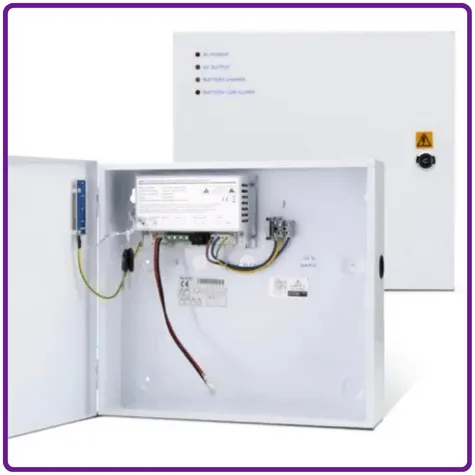
12V or 24V: Which Voltage Do You Need?
The voltage your access control power supply needs to provide is determined by your locking hardware and control equipment, not by preference.
Most standard access control installations in the UK run at 12V DC. This covers the majority of maglocks, electric strikes, standalone keypads, and proximity readers. If you are replacing or extending an existing system, match the voltage already in use.
24V DC is the better choice when:
- Power consumption is a concern. Mag locks use have the amount of current at 24V compared to 12V
- Devices specify 24V operation
- You are integrating with CCTV or fire alarm systems already running at 24V
Where voltage drop is a concern, choose a power supply with an adjustable output. These can often be set to 14V on a 12V power supply for example, meaning any voltage drop on long cable runs is accounted for. For a practical guide to voltage drop calculation, the SDC Security voltage drop calculator is a useful reference when specifying longer runs.
Both voltages are widely available. Quantek stocks boxed access control power supplies in 12V and 24V versions across multiple amperage ratings.
How Many Amps Do You Need?
This is where installers most commonly make mistakes. Specifying amperage by door count alone is not accurate. You need to calculate by load.
Step 1: List every device the PSU will power.
Work through each component: the lock, the reader, the controller, any exit buttons with LEDs or sounders, and any additional ancillaries drawing from the same supply.
Step 2: Find the current draw for each device.
This is in the manufacturer’s datasheet, usually listed in milliamps (mA) at your chosen voltage. Note that some devices, particularly solenoid-based electric locks, have a higher activation current than their hold current. A solenoid bolt might hold at 120mA but surge past 1,000mA at activation. If you are running two of those from one supply, your sizing needs to account for simultaneous activation. The National Lock Supply amperage guide covers load calculation in useful practical detail.
Step 3: Add up the total load, then apply a safety margin.
Add all device currents together. A good practice is to size your PSU so the connected load sits at no more than 70 to 80% of the rated output. This gives you headroom for battery charging current and any future additions to the circuit.
A straightforward example: if your total connected load comes to 1.8A, a 3A PSU is a sensible minimum choice, not a 2A unit running near capacity.
Quantek’s lockable boxed power supplies are available in 1A, 3A and 5A ratings at 12V, and matching options at 24V, so you can match the supply to your actual load requirement.
Do You Need Battery Backup?
For most commercial access control installations, yes. Battery backup is not an optional extra. It is how the system behaves predictably when the mains goes down.
This matters for two reasons.
Fail-safe vs fail-secure operation. A fail-safe lock (like most maglocks) releases when power is lost. Without battery backup, a mains failure means the door opens. That is fine in a fire escape context but not acceptable for a secure entrance. A battery-backed PSU keeps the lock energised during a power outage. A fail-secure lock remains locked on power loss, but the controller and reader still need power to grant legitimate access.
Continuity of connected systems. If your PSU feeds not just the lock but also a proximity reader and door controller, losing power takes the whole entry point offline. Battery backup keeps everything running, typically for several hours depending on battery capacity and system load. The Kisi guide to access control backup batteries gives a useful overview of how backup duration is calculated against system load, and what installation best practices look like for battery-backed supplies.
A PSU with integrated battery backup will include charging circuitry that keeps the battery maintained without intervention, and usually provides LED indicators for mains present, battery charging, and battery fault conditions.
Battery backup units typically take a sealed lead acid (SLA) battery, sold separately. The BATT2.1 2.1Ah battery, available from Quantek, is a common choice for smaller installations running on a 12V 1A or 3A supply. The BATT7 is ideal for higher load applications.
A Note on Battery Maintenance and Replacement
Sealed lead acid batteries used in access control PSUs are maintenance-free in normal operation, but they do not last indefinitely. According to Power Sonic’s SLA battery guide, design life ranges from five to ten years for most standard units, depending on conditions and usage patterns.
In access control applications, a few things shorten battery life faster than expected:
- Consistently high ambient temperatures in plant rooms or comms cupboards
- Frequent deep discharge from regular power outages
- A PSU fault that results in the battery being overcharged or undercharged over time
A battery measuring below 11V under load is past its useful life and should be replaced. Most quality PSUs with battery monitoring will flag this via a fault LED before the system becomes unreliable. If you want more detail on SLA battery care, AJC Battery’s charging guide covers the key dos and don’ts clearly.
Keeping a note of battery installation dates and checking condition during any annual service visit is the simplest way to avoid an unplanned failure.
Boxed, Lockable Enclosures: Why They Matter
A quality access control PSU comes in a metal enclosure for a reason. It protects the internal electronics from dust, moisture and interference, and a lockable box prevents tampering.
On a commercial or institutional site, the PSU is often installed in a plant room, comms cupboard, or false ceiling. A lockable metal box means that if someone unauthorised gets into that area, they cannot easily disconnect or bypass the power supply.
For sites where the access control installation is part of a wider intruder alarm or security system that must meet BS EN 50131 (the UK and European standard for intruder and hold-up alarm systems), tamper protection on the PSU enclosure is not just good practice. It is part of the compliance requirement for Grade 2 and above systems. If you are not familiar with BS EN 50131 grading, the NSI NACP 30 code of practice and this overview from Clarion Security both give a clear account of what each grade requires.
Quantek’s range of lockable 12V and 24V boxed power supplies includes units with battery backup and sufficient internal space to house the backup battery alongside the board. The compact design keeps installations tidy without sacrificing access for servicing.
Switch Mode vs Linear: What It Means in Practice
Most modern access control power supplies use switch mode technology. Switch mode PSUs are efficient, generate less heat than linear equivalents, and are physically compact.
The main consideration is that some switch mode units produce a small amount of AC noise on the DC output. For most access control hardware this is not an issue. For particularly sensitive controllers or panels, a linear PSU or a unit with good output filtering gives cleaner power. The SDC Security Power Guide goes into useful technical depth on the differences between switching, linear, and hybrid supplies if you are specifying for more complex installations.
If you are experiencing intermittent reader errors or erratic controller behaviour on an existing installation, checking the power supply output quality is worth doing early in the fault-finding process.
Quantek’s switch mode boxed supplies are designed for professional security applications including access control, CCTV and fire alarm systems, and have been selected to work reliably with standard locking hardware.
Choosing a PSU for Different Installation Types
Single door, one lock and reader. A 12V 1A unit with battery backup is often enough, provided your load calculation supports it. The CPK0 access control kit from Quantek includes the PSU-BB-12V-1A as standard, paired with a 600lb maglock. A well-matched starting point for a straightforward swing door installation.
Single or double door with additional ancillaries. If you are powering a lock, reader, controller, exit button with sounder, and potentially an intercom, move up to a 3A unit. This gives you adequate headroom and covers the charging load on the backup battery.
Multi-door or higher-draw devices. A 5A supply, available in both 12V and 24V versions, handles larger loads. At 24V, the PSU-BB-24V-5A is suitable for multi-lock configurations, larger CCTV setups, and systems where multiple devices share a single supply.
For smart app-controlled installations, the CPK5 door entry kit includes a matched PSU alongside a Bluetooth keypad with fingerprint and proximity reader capability.
Common PSU Problems and What Causes Them
Intermittent access faults. Often voltage sag under load. Check the PSU output voltage with a multimeter while the lock is energised. If the voltage is dropping significantly below rated output, the supply is undersized or the battery is deteriorating.
Reader errors and erratic controller behaviour. May indicate dirty power or cable routing issues. Cables run alongside fluorescent lighting or over noise-generating equipment can pick up interference. The Door Controls Direct PSU guide covers this topic in more detail for those troubleshooting existing installations.
LED indicators showing battery fault. The battery is either at end of life or not being charged. Check connections first, then measure battery voltage. A 12V SLA battery reading below 11V under load is due for replacement.
Summary: What to Check Before You Specify
Before ordering your access control power supply, confirm:
- Voltage. 12V or 24V, matching your locking hardware and control equipment.
- Amperage. Calculated from total device load, not door count. Allow 70 to 80% headroom.
- Battery backup. Required for most commercial applications. Match battery capacity to desired backup duration.
- Enclosure. Lockable metal box for commercial sites. Ensure there is space for the battery inside.
- Technology. Switch mode for most applications. Consider output quality if sensitive controllers are involved.
Quantek’s full range of access control power supplies is available to order online with next day delivery on UK mainland orders placed before 1.30pm. If you are unsure which unit suits your installation, call the team on 01246 417113 and someone will help you work through the load calculation.